Dog Bohemian Rhapsody AI · Human Piano Version
The human version of dog bohemian rhapsody AI puts the adult in your photo behind a grand piano on a dark concert stage. The camera moves closer during a closed-eye performance, followed by a look toward the lens. This preset accepts an adult portrait; it creates a human pianist.
Create my piano performance · 30One photo → a concert close-up
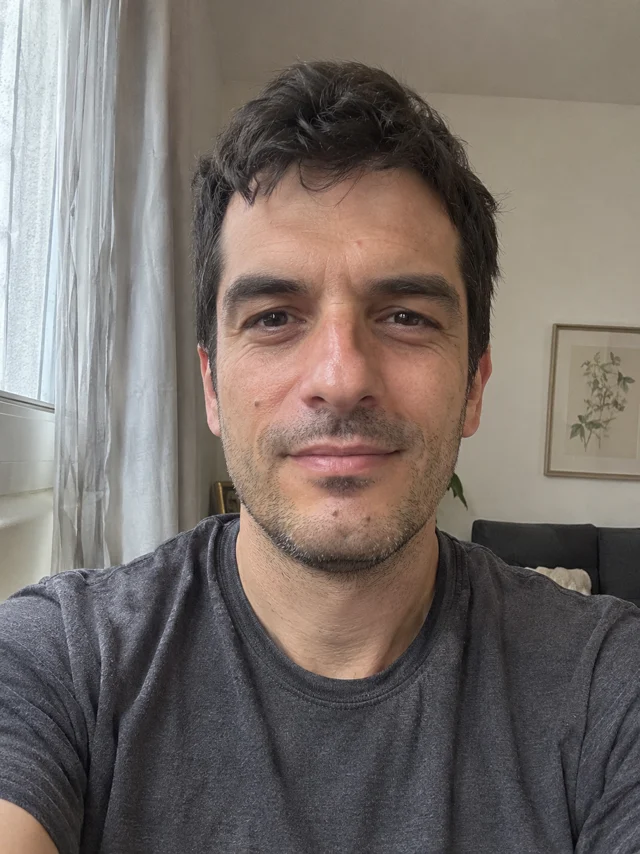
Real test with this fictional adult: eyes closed at the piano from 0–12s, a look into the lens around 13–14.25s, then a gentle downward finish. The piano hides most fingers, so precise key playing cannot be judged. Facial detail and framing can vary.
The dog bohemian rhapsody AI concert close-up
The signature scene starts at a black grand piano with a microphone in front of the singer. A measured push-in brings the face closer while the eyes stay closed. The final look into the lens is the small change to watch for. This is a visual concert adaptation with an adult performer and original generated audio.
Give your face a clear starting point
Choose one sharp photo of one adult with their hair, face and shoulders visible. Even daylight helps preserve recognizable features. Avoid sunglasses, face filters, a second person or an animal. Keep your own visible outfit in the photo. You do not need a piano, costume, microphone or stage in your picture; the preset creates that setting.
Create my piano performance · 30Watch the eyes, hands and microphone
Before saving, play the complete result. Follow the face through the camera move, then check whether the eyes open toward the lens. Look at the hands on the keys and the space between the microphone and mouth. The input and output comparison above uses the same fictional adult, so you can judge this actual run. New results can differ in expression, framing, fingers and facial detail.
Make your piano video in three steps
Add one adult photo
Upload a permitted JPEG or PNG. Confirm that you have permission to use and upload the photograph.
Review the credits and generate
Sign in and check the current quote beside the button. Click Generate once, then follow the task progress on this page.
Watch and download
Watch the whole fifteen-second clip and save the vertical MP4. Use your platform’s AI label when sharing a generated performance.
Before you take the piano seat
What does dog bohemian rhapsody AI create here?
This preset makes the human concert version from one adult photo: a black grand piano, a slow camera push-in and an expressive face close-up. It does not accept pet photos.
Does the video include Queen’s original recording?
No. The preset supplies original generated audio. The original song, recognizable lyrics and a celebrity voice are not included, and exact lip sync to that song is not promised.
What is the format and price?
A vertical 9:16 MP4 at 480p, about fifteen seconds long. Check the current credit quote before generating. Each new attempt spends credits again.
Can I change the stage or add another performer?
This preset uses a fixed concert scene and one adult lead. Your photo provides the person’s appearance; the scene and movement are supplied automatically.