AI Camera Orbit Video Effect · A Portrait With Depth
The ai camera orbit video effect moves the viewpoint around the adult in your photo while the person stays mostly still. Trees shift at different depths, turning a flat portrait into a short cinematic introduction. Upload one permitted photo; the scene and camera movement are already prepared.
Create my orbit video · 15One photo → a moving viewpoint
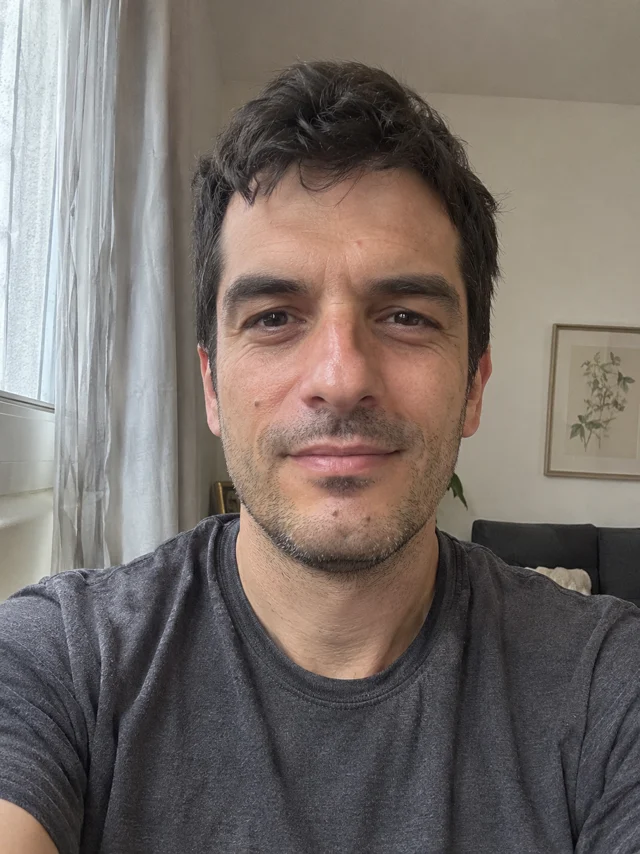
Real test with this fictional adult. The camera reaches a stronger side profile than planned, and hands remain outside the frame. This is a partial orbit, not a full 360° reconstruction.
How the ai camera orbit video effect moves
The intended shot begins at the front, follows one smooth arc and settles into a three-quarter portrait. The background should slide behind the shoulders while the person remains centered. This preset uses a partial arc: it does not promise a complete 360-degree turn. It is designed for a profile introduction, a portrait reel or a short reveal where a gentle viewpoint change adds depth without requiring a performance.
Choose a photo with room around the face
Use a clear photo of one consenting adult, ideally framed from the waist upward. Keep the hair and shoulders inside the edges, with even light on the face. A visible foreground and background help you judge depth. Avoid sunglasses, heavy blur, another face crossing the subject or a crop through the chin. The output can invent details that are absent from the photograph, including the side of a hairstyle or clothing. Choose another photograph when those details need to be exact.
Create my orbit video · 15Orbit, spin and roll are different movements
In a camera orbit, the viewpoint moves around a mostly stationary person and the background changes perspective. In a body spin, the person turns while the viewpoint stays in place. A camera roll tilts the horizon. This page provides the portrait camera arc only. It does not offer a separate fast dolly, body spin or horizon roll. Look for background parallax instead of judging the result only by whether the face becomes larger.
A practical review before you share
Watch the beginning, middle and ending at normal speed, then pause on the changing cheek, ear and shoulder outlines. Check that the same person remains attached to the same outfit and that background branches do not bend through the face. A blink is normal; a second face, a sudden cut or a sliding whole image is a reason to reject a result. This is a creative interpretation from one photograph, not a measured scan of hidden surfaces. Keep the complete ending and add the platform’s AI disclosure when sharing.
What our eight-second test showed
At 0–1 seconds, the adult is shown from the front in a park. Around 2.5 seconds, the cheek and shoulder angle change while the tree trunk moves behind the subject. By 5.5 seconds, the view is more side-on, and it stays near that angle through the ending. The face, dark hair and grey T-shirt remain recognizable. Hands are outside the frame, so this example does not demonstrate finger quality. These observations describe this sample; another photo can behave differently.
Make your portrait in three steps
Upload one adult photo
Choose a permitted JPEG or PNG with a clear face and visible shoulders. Only the photograph is needed.
Review credits and generate
Sign in, check the current quote and press Generate once. Follow progress on the page; checking progress does not create another video.
Watch and download
Review the complete MP4 for stable identity and camera motion. Download the result you accept; a new attempt spends credits again.
Questions before you create
What does the ai camera orbit video effect create?
An eight-second vertical portrait with a partial camera arc around the adult in your photo. The person should remain mostly still while the viewpoint and background perspective change.
Does it reveal the real back of my head?
No. A single photo cannot show hidden surfaces. Newly visible hair, ears, clothing and scenery are synthesized and can differ from reality.
Do I need a video, an audio file or written directions?
No. Upload only one permitted adult photo. The scene and camera movement are included, and no source recording is required from you.
What are the output and cost?
The current preset is about eight seconds, vertical 9:16 and 480p, delivered as MP4. Check the live credit quote before generating. Another attempt costs credits again.
Is this a full 360-degree rotation?
No. This preset is a gentle partial orbit ending at a three-quarter angle. It has no selectable full-circle, fast-dolly or body-spin mode.